
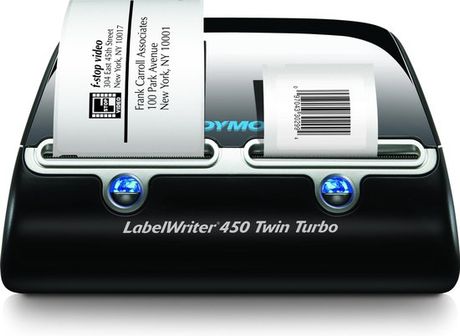
DYMO LabelWriter 450 Twin Turbo Label Printer

DYMO LabelWriter 450 Twin Turbo Label Printer

2.0(1)
Review schrijven over DYMO LabelWriter 450 Twin Turbo Label Printer

Leuk dat je een review schrijft! Door het achterlaten van jouw eerlijke en goed onderbouwde mening over dit product, help je andere consumenten bij het maken van de juiste keuze! Daarnaast verloten we ieder maand onder alle reviewers 2 x € 250,-. Klik hier voor de actievoorwaarden.

Welk cijfer geef jij dit product?

Alle 1 prijzen en aanbieders

Meest populaire keuze – Scherpste prijs!
123inkt.nl· Bekende aanbieder
€ 229,50
-10% prijsdaling
24 uurVerz. € 4,95
Vandaag besteld, morgen in huis!
Bekijk product
Bekijk product

Specificaties

Overige kenmerken
Draagbaar
Nee
Wordt geleverd met de volgende software
Ja
Type input/output
USB
Verpakking hoogte
24,7 cm
Verpakking breedte
30,8 cm
Geschikt voor besturingssysteem
Mac compatibel
USB
Ja
Verpakking lengte
46 cm
Verpakkingsgewicht
2,67 kg
EAN
3501170838907
Printer technologie
Thermisch transfer
WIFI
Nee
Bluetooth
Nee
Draadloze verbinding
Nee
Kleur
Zwart
Merk
DYMO
Model
450 Twin Turbo - refurbished
EAN
3501170838907
CE markering
Nee
MPN (Manufacturer Part Number)
S0838900
Systeemeisen
Mac compatibel
Toetsenbord indeling
QWERTZ

Productomschrijving

Hardware & Software\n- Label faster. Mail smarter. Look sharp!\n- Make any office more productive, efficient and professional\n\nHardware\n- Increase your labelling and mailing efficiency with the DYMO® LabelWriter™ 450 Twin Turbo label printer\n\nSoftware\n- Work faster and smarter with the included DYMO Label™ v.8 Software\n\nLabel faster. Mail smarter. Look sharp!\nIncrease your labelling and mailing efficiency with the DYMO® LabelWriter™ 450 Twin Turbo label printer\nThe DYMO® LabelWriter™ 450 Twin Turbo label printer holds two label rolls, so you can print address and shipping labels even faster. Label, mail and file smarter with the proprietary DYMO Label™ v.8 Software which enables you to create and print address, shipping, file folder and barcode labels, plus name badges and more – all without the extra work and hassles of printing sheet labels on a standard desktop printer.\n\n- Works with Windows® XP, Windows Vista™, Windows® 7 or Mac OS® v.10.4 or later\n- USB connected; includes cords, cables, software, instructions and starter labels\n\n- Have two rolls of labels ready to print at all times – perfect for printing address and shipping labels without swapping label rolls\n- Label, mail and file smarter with the proprietary DYMO Label™ v.8 Software\n- DYMO Label™ v.8 Software enables you to create and print address, shipping, file folder and barcode labels, plus name badges and more—all from your PC or Mac®\n- Print fast – up to 71 labels per minute*, 40% faster than our base printer\n- Uses thermal printing technology – no expensive ink or toner needed, ever\n- Create labels directly from Microsoft® Word, Excel®, Outlook® and CardScan®, without retyping\n- Built-in address book easily prints labels from your Outlook® Contacts or Mac® Address Book – just search and filter your contacts to print exactly the labels you want\n- Quickly create a one-off label whenever you need one with the QuickPrint widget\n- Print one label or hundreds, without the waste and hassles of sheet labels\n- Print crystal-clear text, graphics and barcodes with improved graphics mode (600 x 300 dpi)\n- Browse all available label layouts on your screen – quickly find the best label for any job\n- Sleep mode to conserve energy\n- Share with co-workers using Windows®/Mac® printer sharing\n- Put it anywhere – its compact size, new design and colors fit in any modern workspace

Reviews

miedema07-07-2020
Algemene score
2.0
Helaas bevalt deze Dymo Writer erg slecht .Tekst valt niet automatisch op etiket ondanks auto fit tool bv,de machine switcht niet automatisch van groot label naar klein label en visa versa, er zitten zo veel onzinnige instellingen op die het erg compliceren en zo kan ik nog wel even door gaan .helaas .We hebben dagelijks veel ergernissen hier door .
Minpunten
  • gebruiksonvriendelijk
  • tekst past niet in kader
  • veel onzinnige functies

Schrijf een review

Heb jij dit product in bezit en wil je graag je mening geven? Start dan hieronder met het schrijven van je review. Afhankelijk van de details duurt het schrijven van een review gemiddeld tussen de 3 en 10 minuten. Met jouw mening help je andere bezoekers een betere keuze te maken én maak je iedere maand kans op €250,-! Klik hier voor de actievoorwaarden.
Welk cijfer geef jij dit product?