Review schrijven over QNAP TL-R1200S-RP

Leuk dat je een review schrijft! Door het achterlaten van jouw eerlijke en goed onderbouwde mening over dit product, help je andere consumenten bij het maken van de juiste keuze! Daarnaast verloten we ieder maand onder alle reviewers 2 x € 250,-. Klik hier voor de actievoorwaarden.

Welk cijfer geef jij dit product?

Alle 1 prijzen en aanbieders

Marketplace aanbod

Meest populaire keuze
€ 2.214,02Gratis verzending
3 tot 4 dagen
Check de website voor de levertijd | Gratis bezorgd > €20,-

Bekijk product

Specificaties

Belangrijkste kenmerken
EAN
4713213516232

Productomschrijving

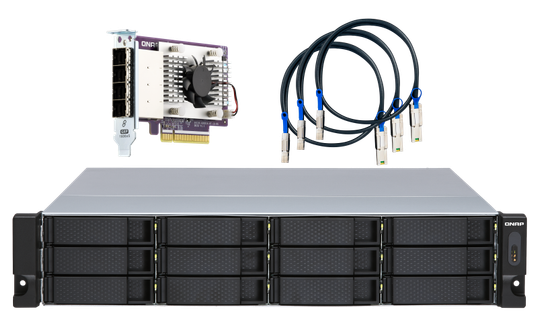
TL-R1200S-RP Rackmount JBOD storage enclosure allows you to back up and expand your QNAP NAS, Windows® and Ubuntu® computers and servers. The TL-R1200S-RP features twelve 3.5-inch SATA 6Gb/s drive bays, TL-R1200S-RP comes with a QXP PCIe card for connecting the enclosure using a SFF-8088 (or SFF-8644) cable. It provides reliable read/write performance for smooth storage and backup tasks.\n\nHigh-performance of TL SATA JBOD\nThe TL SATA JBOD supports multi-lane SATA 6Gb/s transfer, and each SATA lane directly connects to a single SATA drive to help improve performance. With the 1-1 high-speed channel, the TL SATA JBOD delivers excellent transfer performance.\n\nFlexible Storage Configuration and Management\nThe TL-R1200S-RP provides software-controlled storage configuration for greater management flexibility. You can configure RAID and monitor JBOD enclosure and disk health with Storage & Snapshots when connected to a QTS or QTS hero NAS, or with the QNAP JBOD Manager utility when connected to a computer.\n\nWhat you need to know\nYou can connect your TL-R1200S-RP to Windows® and Ubuntu® computers and servers through the SFF-8088 (or SFF-8644) high-speed cable and use built-in utility to manage the RAID configuration.\n\nIntelligently Monitor JBOD Enclosure Status on PC and Servers with QNAP JBOD Manager\nThe QNAP JBOD Manager is a desktop utility for monitoring the TL-R1200S-RP on Windows and Ubuntu computers. You can quickly obtain the disk statuses, JBOD information and health, view fan rotation speed, and check for firmware version updates. All device events are recorded, and will send desktop notifications when a system alert occurs.\n\nFlexibly Expand Connectivity with QXP PCIe Cards\nInstall an exclusive QXP PCIe card onto your QNAP NAS, Windows® or Ubuntu® PC and servers to connect the JBOD enclosure via SFF-8088 (or SFF-8644) cable, for easy and flexible storage expansion.\n\nVersatile usage scenarios to meet storage expansion needs\nThe TL-R1200S-RP meets many storage expansion requirements for the home and office. Below is a list of potential application scenarios:\n\nScenario 1: Expand your NAS capacity\nThe TL-R1200S-RP provides an alternative method for users to expand their NAS storage capacity. By connecting the TL-R1200S-RP to their NAS and using Storage & Snapshots Manager in QTS or QTS hero, users can easily configure and manage their storage expansion. The TL-R1200S-RP supports a variety of QNAP NAS storage and file management functions, allowing users to build storage pools, finding files with Qsirch, and organizing files with Qfiling.\n\nScenario 2: External storage for your NAS\nYou can use the TL-R1200S-RP to expand your NAS storage. You can select disks to create storage pools for expanding your NAS capacity, or you can treat each disk as an individual external storage space and use it as a removable drive for greater flexibility. Regardless of the mode you use, you can always use Storage & Snapshots Manager in QTS or QTS hero to set up and manage your TL-R1200S-RP and use hard drive S.M.A.R.T. and Notification Center to check disk status anytime and anywhere.\n\n- Scenario 3: Expand the storage space of your Windows® and Ubuntu computers and servers\nYou can use your TL-R1200S-RP with Windows and Ubuntu computers and servers to expand more storage space. You can set up the RAID configuration of your TL-R1200S-RP to further secure data protection. Moreover, you can also use the single disk mode and format with exFAT file system for more convenient access and sharing of files between Windows and Ubuntu computers.\n\nScenario 4: Third-party hardware RAID card for advanced protection\nYou can install third-party hardware RAID cards on your TL-R1200S-RP for advanced hardware RAID 1, RAID 5, RAID 6, RAID 10, RAID 50, and RAID 60 protection and use Windows® utility software to manage your TL-R1200S-RP.\n\nTL-R1200S-RP Offers Better Performance Than Other USB and eSATA JBOD Solutions\nThe TL-R1200S-RP features SFF-8088 (or SFF-8644) connectivity and multiple SATA 6Gb/s bays. This provides better sequential read performance and faster data transfer speeds than existing USB and eSATA expansion enclosures, while also being a more economical option compared to a QNAP REXP SAS enclosure.

Reviews

Er zijn nog geen reviews geschreven

Heb jij dit product in bezit en wil je graag je mening geven? Start dan hieronder met het schrijven van je review. Afhankelijk van de details duurt het schrijven van een review gemiddeld tussen de 3 en 10 minuten. Met jouw mening help je andere bezoekers een betere keuze te maken én maak je iedere maand kans op €250,-! Klik hier voor de actievoorwaarden.

Welk cijfer geef jij dit product?