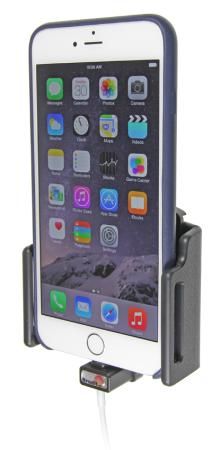
Brodit 514667 - Houder - Apple iPhone 6 Plus - Zwart

Brodit 514667 - Houder - Apple iPhone 6 Plus - Zwart - Houders voor mobielen

Brodit 514667 - Houder - Apple iPhone 6 Plus - Zwart - Houders voor mobielen

Alle 1 prijzen en aanbieders

Prijsalert instellen

Marketplace aanbod

Meest populaire keuze
€ 49,95Gratis verzending
3 tot 4 dagen
Check de website voor de levertijd | Gratis bezorgd > €20,-

Bekijk product

Prijshistorie

Stel een alert in en mis geen prijsdalingKrijg een seintje zodra de prijs zakt

Specificaties

Belangrijkste kenmerken
EAN
7320285146679

Productomschrijving

Adjustable Holder. Fits devices with slim skin. For use with Apple original Lightning to USB Cable.\n\nThis holder for cable attachment can, combined with an Apple cable, be used for charging your iPhone. First you mount the cable into place onto the holder, then it connects automatically to your iPhone every time you place the device in the holder.\n\nNote! Cable not included.\nThe cable attachment holder can be combined with Apple original Lightning to USB Cable (Apple article. no. MD818ZM/A. You can charge you iPhone by connecting it to the car’s USB socket, or use it with a USB/cig-plug adapter for the car’s 12V socket.\n\nTo use the holder, you first set the width to fit for your skin, then you can easily place your iPhone in the holder. Fits devices with slim sized skins.\n\nThe holder is made of black ABS plastic. It is easy to put the device into the holder, and just as easy to take it with you when leaving the vehicle. The holder is equipped with a tilt swivel so you can adjust the angle of your device in order to avoid light reflection on the screen. Attach onto ProClip Mounting Platform.\n\nINSTALLATION INSTRUCTIONS:\n1. To adjust the holder for your device: Loosen the screws on the front side of the holder, so the sides of the holders can be adjusted. Place the device in the holder and press the sides together so the device is firmly in place. Tighten the screws on the front side of the holder.\n\n2. Place the connector of the cable in the hole in the lower part of the holder. Carefully press the connector downward and forward so it passes the locking and goes into the hole. Press until you hear/feel the connector snap into place in the holder.\n\n3. Loosen the screw in the center of the holder so you can remove the tilt swivel attaching plate on the back. Place the attaching plate onto the desired position. Screw the attaching plate into place with the enclosed screws. Place the holder over the attaching plate so the screw fits in the hole in the tilt swivel. Screw a few turns on the screw, just so the thread starts to pull. Pull the holder toward you and hold it slightly tensed, in the same time tighten the screw so the holder is pulled toward the tilt swivel. Tighten the screw firm at first, then loosen it a bit so the holder is firmly in place, but still can be adjusted.\n\n4. The holder is in place.

Reviews

Er zijn nog geen reviews geschreven

Heb jij dit product in bezit en wil je graag je mening geven? Start dan hieronder met het schrijven van je review. Afhankelijk van de details duurt het schrijven van een review gemiddeld tussen de 3 en 10 minuten. Met jouw mening help je andere bezoekers een betere keuze te maken én maak je iedere maand kans op €250,-! Klik hier voor de actievoorwaarden.

Welk cijfer geef jij dit product?