
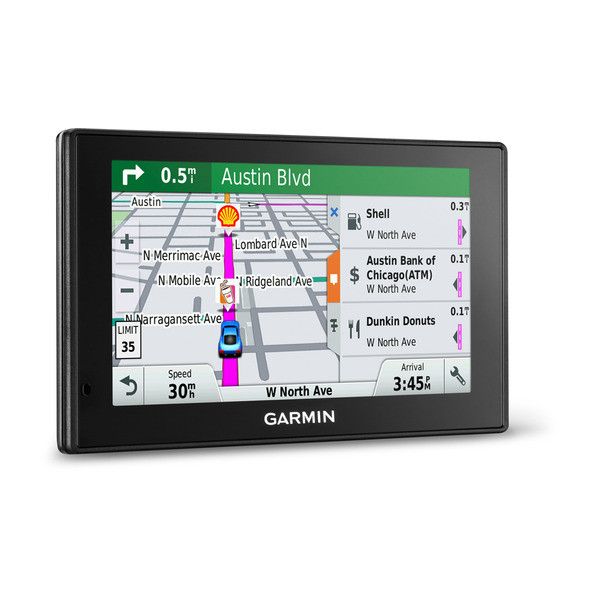
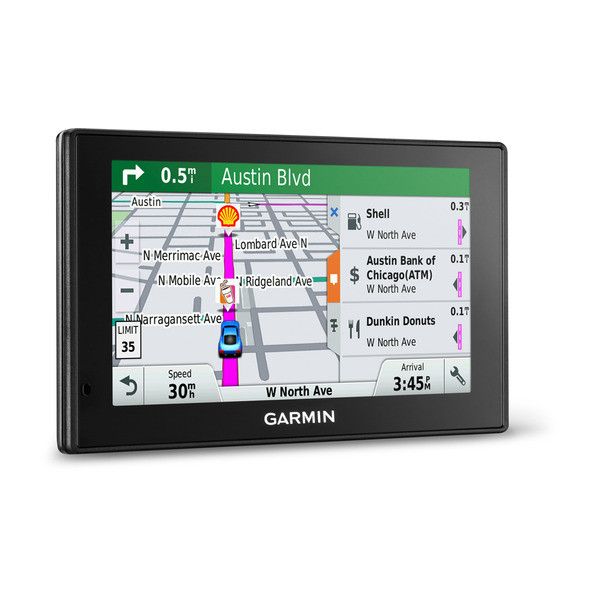

Garmin DriveSmart 50LMT-D - Navigator - 5" - TFT - Touchscreen - Black

Garmin DriveSmart 50LMT-D - Navigator - 5" - TFT - Touchscreen - Black - Kaartplotters en GPS voor boten

Garmin DriveSmart 50LMT-D - Navigator - 5" - TFT - Touchscreen - Black - Kaartplotters en GPS voor boten

We konden geen prijzen vinden voor dit productGelukkig hebben we een paar sterke alternatieven voor je gevonden, deze vind je verder op de pagina.

Vergelijkbare of betere producten

KVH NX-855 IP AUTOSWITCH - Unisex - Multicolored
v.a. € 795,67
Bekijk productBekijk product
TaylorMade Clip - Unisex - Multicolor - Standard
v.a. € 134,92
Bekijk productBekijk product

Specificaties

Belangrijkste kenmerken
EAN
0753759157272

Productomschrijving

Helpful Driver Alerts for Your Daily Commute\nGarmin DriveSmart GPS navigator provides driver alerts to encourage safer driving and increase situational awareness. Warnings include alerts for sharp curves, speed changes, railway crossings, animal crossings and more. Additionally, Garmin DriveSmart notifies you when driving the wrong way on a one-way street and sends warnings for nearby school zones. Receive alerts for nearby red light and speed cameras, and be prepared for sudden halts in traffic with upcoming traffic jam6 alerts. For longer drives, a fatigue warning suggests break times and potential rest areas after hours of driving. The Up Ahead feature lets you easily see places up ahead and milestones along your route like borders, without leaving the map view.\n\nTalk to Garmin DriveSmart\nGarmin DriveSmart offers you the option of convenient voice-activated navigation. Control Garmin DriveSmart with your voice, while your hands remain safely on the wheel (Full Europe model only).\n\nExtensive Smart Features\nSync a Bluetooth-enabled device, such as your smartphone, to Garmin DriveSmart for hands-free calling, and receive smart notifications on your Garmin DriveSmart display. Receive calls, text messages and calendar reminders without ever removing your hands from the steering wheel to reach for your phone. Stay focused on your drive ahead while staying connected with customisable smart notifications that conveniently appear right on your navigation display.\n\nFor real-time information such as weather and traffic conditions, download Smartphone Link mobile app, which connects your Garmin DriveSmart GPS navigator with your compatible smartphone.\n\nNavigate Complex Junctions with Ease\nActive Lane Guidance with voice prompts prepares you to drive through an exit or junction with confidence. As you approach, an animated model uses brightly coloured arrows to indicate the proper lane needed for your route. Bird’s Eye junction view offers a detailed view of junctions, looking down as if from overhead. And, photoReal Junction View realistically displays junctions along your route, including the surrounding landscape.\n\nOur Best Traffic Solutions\nGarmin Digital Traffic via DAB is Garmin's best plug & play traffic solution. Digital Traffic is fast and free² —for the useful life of your device. Receive traffic updates as often as every 60 seconds. Plus, Digital Traffic has a great coverage area that includes motorways, A roads and more minor roads - everywhere you need it. Digital Traffic is voice-activated, so it responds to spoken requests (full europe mopdel only). It can give details about the situation, such as how many minutes of delay to expect and if there are any possible detours. Even learn whether or not you are on the fastest route. Traffic information is delivered straight to your device, out-of-the box.\n\nGuidance Using Recognisable Landmarks\nGarmin DriveSmart redefines “spoken turn-by-turn directions” with Garmin Real Directions™, easy-to-understand driving directions that guide like a friend, using recognisable landmarks, buildings and traffic lights (e.g., “Turn right after the red building” or “Turn left after the McDonalds”). It’s preloaded with millions more new and popular places, thanks to Foursquare®.\n\nFind Exactly Where You Need to Go\nThe Direct Access feature simplifies navigating to select complex destinations, like airports and shopping centres, by finding a place within a larger location. When navigating to the shopping centre, Direct Access gives additional location information for specific retail stores inside. For example, “Arriving at Lakeside. Debenhams is inside, on the upper level”.\n\nEasier to Search, Quicker to Find\nGarmin DriveSmart has a search field that makes it easy to find addresses and millions of POIs. Simply enter a category (like “pizza”), an entire address or a proper name (“Starbucks”), and Garmin DriveSmart quickly returns your results. In case of a misspelling, Garmin DriveSmart provides multiple search results that sound similar to what you’ve entered.\n\nAdd a Camera to Your Drive\nFor a complete navigation solution, Garmin DriveSmart pairs with the BC™ 30 Wireless Backup Camera (sold separately; professional installation recommended). Once connected, you can easily see vehicles, pedestrians and other obstacles right on the Garmin DriveSmart display, as you move in reverse. When traveling with a baby or toddler, add Garmin babyCam™ to your drive. babyCam is an in-vehicle video baby monitor that conveniently provides an “on demand” view of your backseat passenger, right on your navigation display.\n\n- Bright 5.0-inch GPS navigator with dual-orientation, pinch-to-zoom display\n- Detailed maps of a region of Europe with free lifetime map updates and Digital traffic, the fastest traffic solution available from Garmin\n- Click here to see map coverage for Western Europe, here for UK & Ireland and here for Full Europe\n- Free Garmin DIGITAL Traffic via DAB - Garmin's best traffic solution - out of the box!\n- Bluetooth® hands-free calling and voice-activated navigation (full europe model only)\n- Driver alerts for increased awareness, including upcoming sharp curves, school zones, speed changes and more\n- Customisable smartphone notifications4 let you display calls, texts and other app alerts on your navigation screen

Reviews

Prima Navigator04-11-2017
Algemene score
8.0
Sinds een paar dagen dit navigatiesysteem in huis. Het toestel voldoet ruimschoots aan mijn verwachtingen. De prijskwaliteitsverhouding vindt ik prima. Het enige waar ik momenteel problemen mee heb is de telefoon app. Het bellen gaat prima maar het onderbreken van de verbinding is mij tot nu toe niet gelukt.
Pluspunten
  • eenvoudig in gebruik
  • goede kaartweergave
  • prijs kwaliteitsverhouding
Minpunten
  • omschrijving handleiding van het telefoongebrulk
André24-11-2016
Algemene score
6.0
Neemt niet altijd de route die normaal de kortste is en zend u soms door het dorp terwijl de hoofdweg gewoon rechtdoor loopt .Wanneer je hem instelt op geen tolwegen zend hij u toch soms tolwegen op en meld dan pas dat hij de route niet meer kan aanpassen wat ook een grote fout is want je hebt dan in bepaalde landen geen vignet en een risico op een verkeersboete die dan niet mals is .
Pluspunten
  • Goede werking
  • Duidelijk
  • Goede verkeersinformatie
  • snelle herberekening
Minpunten
  • Stuurt u soms om door een dorp
  • soms toch towegen als hij anders ingestelt is .
Lees alle reviews

Schrijf een review

Heb jij dit product in bezit en wil je graag je mening geven? Start dan hieronder met het schrijven van je review. Afhankelijk van de details duurt het schrijven van een review gemiddeld tussen de 3 en 10 minuten. Met jouw mening help je andere bezoekers een betere keuze te maken én maak je iedere maand kans op €250,-! Klik hier voor de actievoorwaarden.

Welk cijfer geef jij dit product?